Healthy lifestyles start here. Sign up and get exclusive offers
2 year warranty
Support homepage
How to install the antenna of my Philips Hi-Fi system?
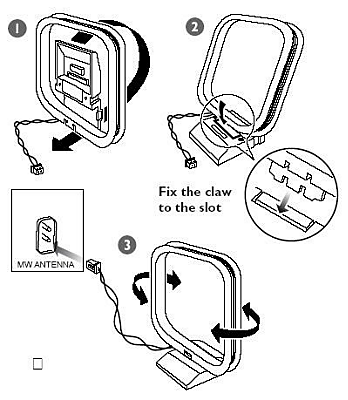
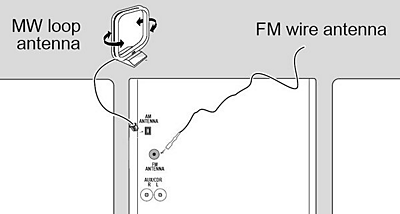
Follow the steps below in order to find out how to install an AM (MW) or FM antenna on your Philips Hi-Fi system:
Hook-up the supplied AM loop antenna to the AM antenna jack at the rear of the unit. Adjust the position of the antenna for best reception.
Connect the supplied FM antenna to the FM antenna jack at the rear of the unit. Adjust the position of the antenna for best reception.
The information on this page applies to the following models: MCD515/98, FWD185/98, FWD182/98. Click here to show more product numbers ›
All (5)
How to set Sound on my Philips device?
How to set the clock on my Philips device?
How to connect the speakers of my Philips HiFi system?
How to switch between languages on my Philips device?
Contacting Philips
We're happy to help you
Looking for something else?
Discover all Philips Support options